
Smart Torrent Organizer for Clean Downloads
Overview
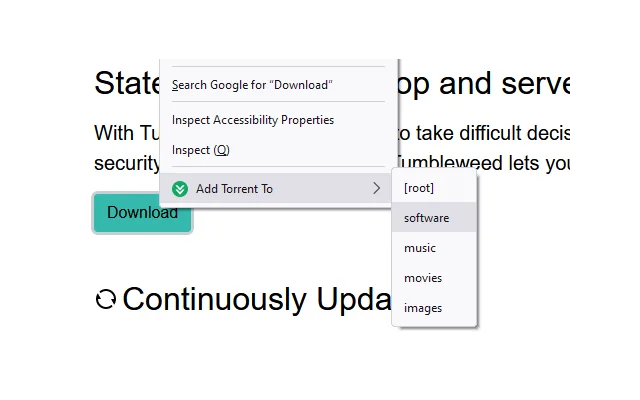
The software is designed to streamline torrent downloads by enabling users to instantly begin downloading torrents or magnet links into predefined directories. This helps prevent clutter in default download folders, ensuring files are automatically sorted into organized locations based on user-defined rules. The tool is particularly useful for individuals managing large volumes of media, software, or other content via torrent networks.
It supports two widely used clients: uTorrent and qBittorrent, allowing seamless integration with existing workflows. While the developer's background is not provided, the software’s focused functionality suggests a practical approach to a common pain point in torrent management. Real-world usage scenarios include organizing downloads by category—such as movies, music, or software—directly upon initiation.
Users who frequently download from multiple sources can benefit from reduced manual sorting and faster access to completed files. The application runs as a desktop utility, operating in the background to monitor and route incoming downloads efficiently.
Key Features & Capabilities
- Instant Download Routing – Automatically begins downloads from torrent or magnet links and directs them to user-specified directories, eliminating the need for manual file movement.
- Configurable Directory System – Users can define custom folders for different types of content, such as Movies, Music, or Documents, and assign them to specific download types.
- uTorrent and qBittorrent Integration – Works with both popular torrent clients, ensuring compatibility across different user preferences and setups.
- Minimal User Intervention – Once configured, the tool operates automatically, reducing the need for ongoing management after initial setup.
- Lightweight Design – With a file size of 15.6 MB, the software is compact and does not impose significant system overhead.
These features are ideal for users who want to maintain a clean and structured download environment. For example, a user downloading a new movie series can set a rule to route all episodes to a dedicated "TV Shows" folder. Similarly, software downloads can be automatically directed to a "Utilities" directory. This automation reduces the risk of misplacing files and improves long-term organization. The software’s ability to act immediately upon link input makes it efficient for users who prioritize speed and structure in their workflow.
User Interface, Workflow & Performance
The user interface is designed for simplicity, focusing on configuration rather than real-time monitoring. Navigation is straightforward, with settings accessible through a central panel where users define routing rules. The workflow begins with setting up directory mappings, followed by launching the software and using it to initiate downloads via supported clients.
The software does not appear to require constant user attention, operating quietly in the background once configured. Performance observations are based on general software behavior patterns. The developer did not specify resource usage details, but the lightweight size suggests minimal impact on CPU or RAM.
Stability is expected to be consistent, given the focused nature of the tool. No performance bottlenecks were reported in the provided data. The software does not appear to include real-time download tracking or client control features, focusing instead on initial routing.
Users should expect a smooth experience if their system supports the required clients.
Compatibility & System Requirements
The software is compatible with Windows and Mac operating systems, making it accessible to a broad user base. It is available in version 1.0.2 and has a file size of 15.6 MB. The developer did not provide additional system requirements, so exact hardware specifications remain unspecified.
Compatibility information is limited to the supported platforms. Users should ensure that both uTorrent and qBittorrent are installed and properly configured on their system to use the tool effectively. No mention was made of cloud sync, mobile support, or web-based components.
The application is intended for desktop use only. Installation is straightforward, and the software operates independently of the torrent clients it integrates with.
Pros and Cons
Pros
- Automatically routes downloads to designated folders, reducing manual sorting.
- Supports both uTorrent and qBittorrent, offering flexibility in client choice.
- Lightweight at 15.6 MB, ensuring minimal system impact.
- Free to use, with no cost barrier for access.
- Simple setup with intuitive configuration options.
Cons
- Exact system requirements were not listed.
- Limited to desktop use with no mobile or web integration.
- Does not include advanced features like download monitoring or bandwidth control.
- Developer background is not disclosed.
- Performance details were not provided by the developer.
FAQ Section
Is Smart Torrent Organizer compatible with my torrent client?
The software supports both uTorrent and qBittorrent. Ensure the client is installed and running on your system to use the tool effectively.
Can I use this tool on both Windows and Mac?
Yes, the software is compatible with both Windows and Mac operating systems.
Is the software safe to download and use?
As a desktop utility designed to route downloads, the software does not execute untrusted code. It operates within the user’s defined environment and does not require elevated permissions.
Does it require an internet connection to work?
Yes, an active internet connection is needed to download torrents and magnet links. The software itself does not require constant connectivity but relies on the torrent client’s network access.
Are updates available for this software?
Yes, the current version is 1.0.2. Updates may be released to improve compatibility, fix bugs, or add minor enhancements. Check the official source for the latest version.
Final Thoughts
Smart Torrent Organizer delivers a focused and effective solution for users struggling with disorganized download folders. Its ability to instantly route torrents and magnet links into customizable directories addresses a common frustration in torrent management. The support for both uTorrent and qBittorrent adds versatility, while the lightweight design ensures it runs smoothly on most systems.
Although it lacks advanced monitoring or control features, its core function is executed efficiently. The free pricing model removes any financial barrier, making it accessible to all users. For anyone who values a clean, structured download environment and wants to reduce manual effort, this tool is a practical choice.
It’s particularly beneficial for media enthusiasts, software downloaders, and power users managing multiple torrents. Download Smart Torrent Organizer now to streamline your torrent workflow today.







